Turn any floor plan into a clean, export-ready PDF.
Upload a PDF, DXF or DWG — snap a photo of a hand-drawn sketch Beta, or mark up a printed plan by hand and we'll apply your edits — and Drafthouse reads it, detecting walls, doors, windows, stairs and room labels, then cleans it into a polished, editable plan you can export as a PDF. No more redrawing by hand in PowerPoint.
No credit card to start · Free plan included · See the live demo without an account.
Welcome back — pick up right where you left off.
Mark up a printed PDF by hand — we apply the edits
Print or export your plan, then edit it the way you already do on paper: cross out a wall with an “X”, scribble over what's gone, strike through a room name. Upload the marked-up PDF and Drafthouse separates your handwritten marks from the printed lines, applies them, and hands back a clean plan. See which marks we read →
Four ways to turn a plan into a clean PDF
Whatever you start with — a sketch on paper, a printed plan you've marked up by hand, a PDF, or a CAD file — Drafthouse reads it and cleans it up into a polished, editable plan.
Hand-drawn & sketched plans
Snap a photo or scan a hand-drawn or sketched plan — even one drawn on a tablet — and Drafthouse reads it into clean walls, doors, windows, stairs and room labels.
PDF with handwritten edits
Print or export a plan, then mark it up by hand — X out a wall, scribble over what's gone, strike through a room name — and upload it. Drafthouse reads your marks and applies the edits.
PDF floor plans
Drop in a PDF — even a multi-page set — and get an editable, polished plan. Pages split automatically into one tab per floor.
DXF & DWG CAD files
Upload exports from any floor-plan app or CAD tool — AutoCAD and the rest — and turn them into clean, brandable exhibits fast.
From a photo of a sketch to a clean PDF — works with what you already have
Then clean it up in a full editor
Every plan opens in a point-and-click editor — move walls, drop in doors and windows, rename rooms and restyle labels, then export a polished PDF exactly how you want it.
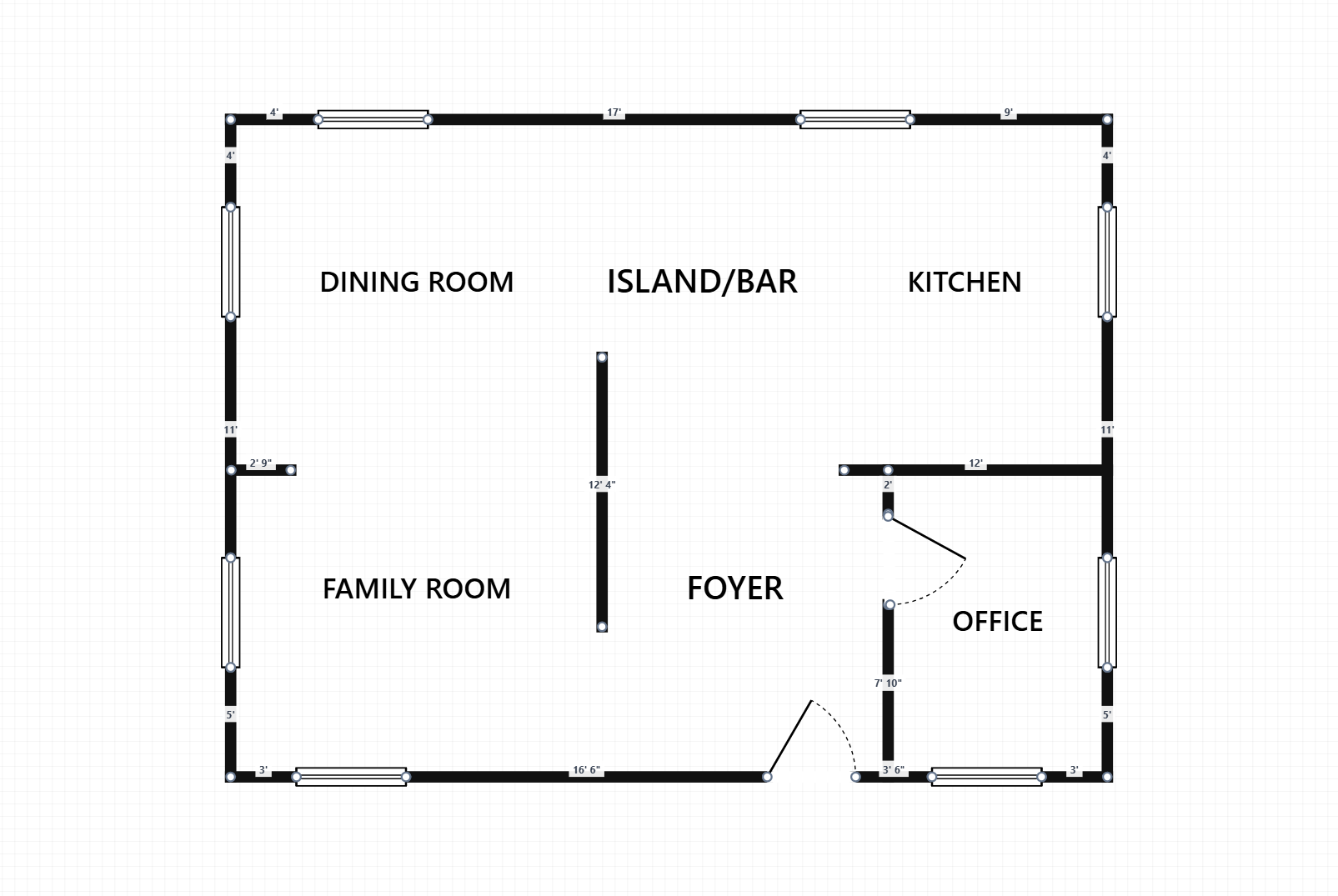
From a hand-drawn sketch to a clean PDF plan
Photograph or scan a sketched floor plan and Drafthouse reads it, cleans it up and hands you a polished PDF — without the hours you'd spend redrawing it in PowerPoint.
Reads your hand-drawn sketch Beta
Snap a photo or scan a hand-drawn or sketched plan and Drafthouse reads it — detecting walls, doors, windows, stairs and room labels. Rough sketches are fine.
Applies your handwritten edits Beta
Mark up a printed PDF or CAD export by hand — cross out a wall with an “X”, scribble over what's gone, strike through a room label — and Drafthouse separates your marks from the printed lines and applies them while it cleans the plan.
Cleans it up automatically
Your messy lines become crisp walls, doors, windows, stairs and labels — even from a photo of a sketch that's hand-drawn or drawn on a tablet Beta — then fix, label and polish anything in a point-and-click editor.
Exports a clean PDF
Turn the cleaned-up plan into a polished, export-ready PDF you can drop straight into a listing, brochure or offering memorandum.
PDF, DXF & DWG too
Already have a CAD file? Upload PDF, DXF or DWG exports from any floor-plan app or CAD tool — multi-page PDFs split into one tab per floor.
Every asset class
Tailored objects and room types for residential, office, retail, industrial, multifamily, hospitality and more.
Optional: stage it with AI
A bonus on plans that include AI — drop furniture into a vacant suite to scale, or describe a reconfiguration and watch the plan adapt.
From sketch to clean PDF in three steps
No CAD experience required. If you can take a photo, you can use Drafthouse.
Sketch & snap it
Draw the plan by hand, then photograph or scan it (PNG/JPG, or a scanned PDF). Already have a PDF, DXF or DWG — or one you've marked up by hand? Upload that instead.
It's read & cleaned up
Drafthouse reads your sketch and turns it into crisp walls, doors, windows, stairs and labels. Fix and label anything in a few clicks — optionally stage it with AI.
Export a clean PDF
Export the cleaned-up plan as a polished PDF, ready to drop straight into a listing, brochure or offering memorandum.
Bonus: it gets smarter with every plan
On plans that include AI, Drafthouse adapts to your sketches the more you use it — so each new plan you read in starts closer to right, and you stop redoing the same cleanup.
Learns your drawing style
Once you've saved a couple of plans, Drafthouse picks up on your typical scale, the door, window and wall sizes you use, and the room names you favor — then applies them to your next upload, so detection starts closer to right.
Remembers your fixes
When you correct or confirm a detection, re-processing the same plan keeps those decisions — it drops what you rejected and keeps what you confirmed — so you never redo the same cleanup twice.
Gets better the more you use it
Every plan you save makes future plans cleaner. The learning is personal to your account — and shared across your Team — so the tool keeps tuning itself to how you work. Available on plans that include AI.
Built for the deals you're pitching
Commercial brokers
- Office, retail, industrial, multifamily and more
- Asset-class–tailored objects and room types
- Clean suite & circulation exhibits for the OM
- Brandable exports with agency-quality polish
Residential brokers
- Clean single-family, condo & multifamily floor plans for listings
- Room labels & dimensions buyers actually understand
- AI-staged rooms to help buyers picture the space
- Brandable exhibits for MLS, brochures and listing pages
Industrial brokers
- Warehouse, distribution & flex-space layouts for listings
- Show dock doors, drive aisles, clear-height and office build-out
- Map suite divisions and circulation for prospective tenants
- Export site-ready exhibits for industrial OMs and flyers
Developers & first-timers
- Test a repositioned layout before you spend on construction
- Stage vacant suites with AI to sell the vision
- Pitch the upside as a first-time developer without hiring a draftsman
- Export exhibits for investor decks and offering memoranda
Frequently asked questions
Everything you might want to know before you turn your first sketch into a clean PDF.
Can it read a hand-drawn or sketched floor plan?
Yes — this is what Drafthouse is built for. Snap a photo or scan a hand-drawn or sketched floor plan (PNG or JPG image, or a scanned PDF) and Drafthouse reads it, detecting walls, doors, windows, stairs and room labels and turning your sketch into a clean, editable plan you can export as a polished PDF. Rough is fine — check the in-app “How to sketch for best results” guide for the simplest marks to draw.
Which file types can I upload?
A photo or scan of a hand-drawn sketch (PNG or JPG image) — even one drawn on a tablet/stylus Beta — plus PDF, DXF and DWG floor plans, including plans exported from any floor-plan app or CAD tool (AutoCAD and the rest), so the files you already have just work. Multi-page PDFs are split automatically into one tab per floor, so a whole building stays organized in a single project.
Can it read a PDF I've marked up or edited by hand?
Yes. Print or export your plan, mark it up the way you already do on paper — cross out a wall with an “X”, scribble over what's gone, or strike through a room name — then upload the marked-up PDF (or a photo of it). Drafthouse separates your handwritten marks from the printed lines and applies them, removing the crossed-out wall and dropping the struck label while it cleans the plan. Everything lands in the point-and-click editor, so you can adjust anything before you export. See the How to mark up a printed plan guide for the exact marks we read.
How accurate is the automatic detection?
Drafthouse reads your sketch (or file) and detects walls, doors, windows, stairs and room labels as a starting point — not a guarantee. Every result lands in a point-and-click editor where you can fix, label and polish anything, so the clean PDF is exactly how you want it before you export it.
Is my upload private?
Yes. You sign in with Google and every project is private to your account — your deals and edits are scoped to you, not shared with other users.
Does Drafthouse learn from my floor plans?
Yes — and only for you. Once you've saved a couple of plans, Drafthouse picks up on your typical scale, room names and the door, window and wall sizes you use, and starts your next upload closer to right. It also remembers the fixes you confirm or reject so you don't redo the same cleanup. This learning is private to your account — and shared only within your Team — never pooled across accounts or used to train other users' results. It's available on plans that include AI.
What's included in the free plan?
The free plan lets you create up to 3 floor-plan projects at no cost, with no credit card to start. Working more deals? Pro and Unlimited raise the limit — and one extra closed deal pays for the tool many times over. See the pricing page for details.
What can AI furnish and remodel do?
AI furnish stages a vacant suite — it drops furniture in and lays it out to scale, so buyers see the upside instead of bare walls. AI remodel takes a described reconfiguration and adapts the plan, so you can pitch a value-add layout without hiring a draftsman.
Do I need CAD experience to use it?
No. If you can build a deck in PowerPoint, you can use Drafthouse. The editor is point-and-click, and detection does the heavy lifting so you don't have to trace anything by hand.
Can I export my work?
Yes. Export any plan to a clean exhibit at any time, and your work auto-saves as you go so deals persist across sessions.
Ready to turn your next hand-drawn plan into a clean PDF?
Snap a sketch and watch it get cleaned up. Start free, or explore the live demo without creating an account.